Best manga translator? Judge the translated page, not the feature list.
Run the same difficult page through every option and score the result on six things: detection, cleanup, bubble fit, vertical type, chapter handling, and corrections. The best tool is the one whose exported page still looks like manga.
Six tests for a manga translator
Compare the output categories on the work a real page requires, then use platform and price as tie-breakers.
| What matters | Browser auto-translate | OCR overlay apps | Sumi |
|---|---|---|---|
| 1. Reads text baked into the image | |||
| 2. Erases the original instead of covering it | Partial | ||
| 3. Fits the translation back into each bubble | Partial | ||
| 4. Preserves vertical Japanese typesetting | |||
| 5. Lets you edit or re-translate one line | Partial | ||
| 6. Translates a whole ZIP / CBZ chapter | Partial | Web batch + native app | |
| Works fully offline | Partial | iPhone, iPad & Mac | |
| Imports PDF / EPUB / MOBI / folders | Partial | Native app | |
| Price | Free | Free / ads / subscription | 5 pages free, then 5 a day to claim, then $6.99/mo for 1,500 pages (up to 12,000 on the largest plan) |
Browser translation wins for selectable web text. OCR overlays can reveal what a panel says quickly. A re-lettering translator is the better fit when you want the finished page itself to remain readable: the original text has to come out and the translation has to fit back in.
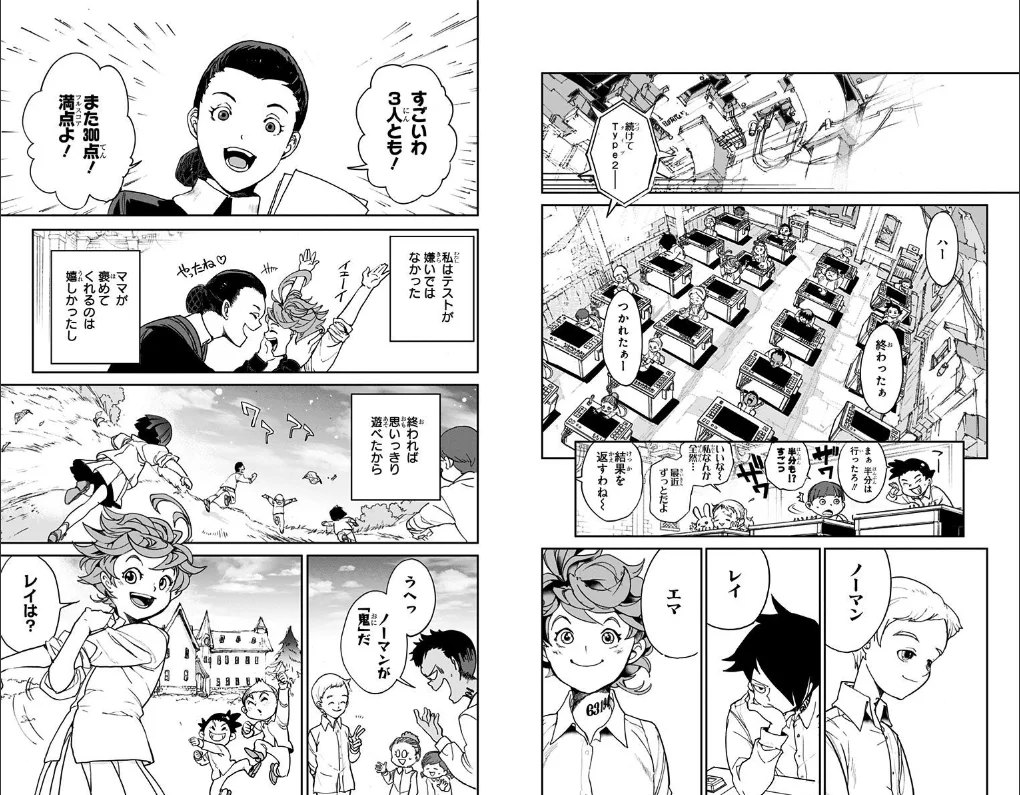
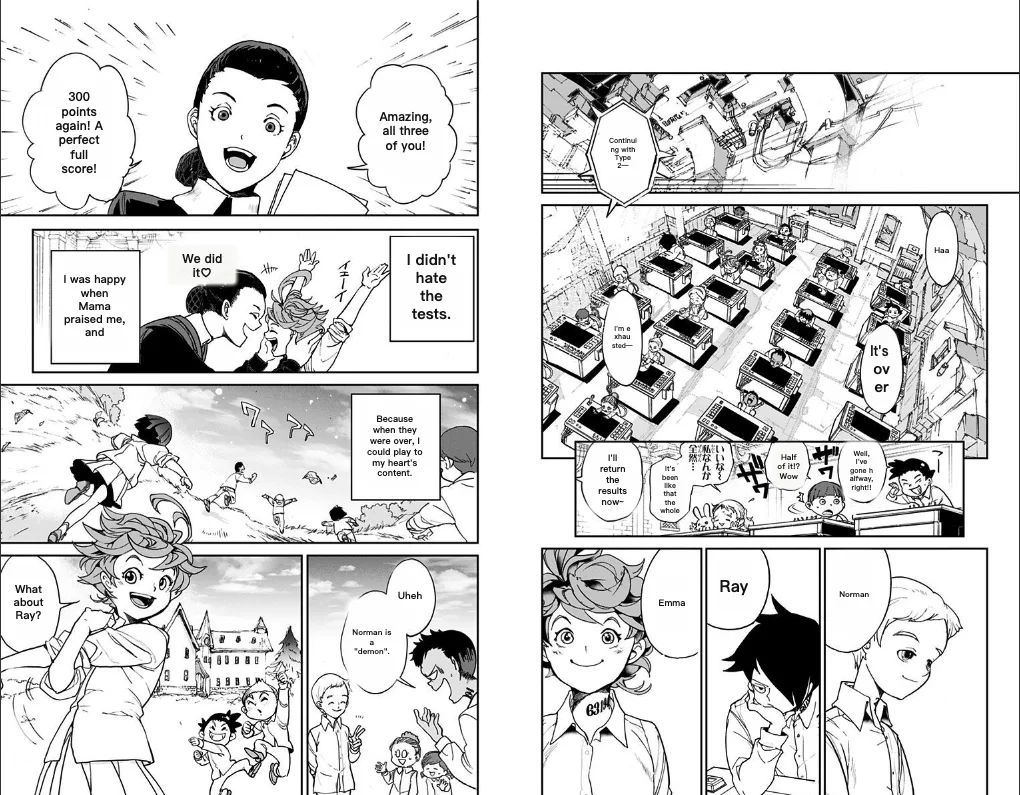 Translated by SumiOriginal
Output test on a real page: drag to inspect whether the original lettering was removed and the translation was fitted into the same panel. The Promised Neverland ch. 1 free episode on Shonen Jump+, translated by Sumi on 2026-09-01.
12 fixed pages, every tool we could test anonymously.
On 2026-09-01 we ran the same 12 pages — official free chapters, captured full-page exactly as a reader sees them — through each tool’s free tier, target language English, one attempt per page. No accounts were created and nothing was cherry-picked; failures are reported as they happened.
| Tool | Pages | Median time | Output notes |
|---|---|---|---|
| Sumi | 12 / 12 | 9.1s | No watermark; full-resolution download; every line editable afterwards. |
| Ichigo Reader | 12 / 12 | 10.0s | Clean lettering; a watermark on every output, and on some pages its free-tier notice (“ENGLISH OCR IS TIER 2 ONLY”) is printed into the artwork; occasionally skips a bubble. |
| MangaTranslate | 9 / 12 | 12.0s | All three failures were Shonen Jump+ pages (the same language-detection error on every attempt and retry); a large watermark on every output. |
| Scan Translator | not tested | — | Has a 3-image anonymous trial, but it refused our test network (“disable your VPN or proxy”), so we could not run it. Not judged. |
| Torii | not tested | — | No anonymous tier — uploading requires an account, so it was outside this anonymous-only run. Not judged. |
Where Sumi lost points in our own scoring: narrow bubbles sometimes break a word across lines (3 of the 8 Japanese pages), a very large stylized sound effect is occasionally skipped, and dark stylized captions can leave a ghost of the original. We publish these because a comparison you can’t trust about its author isn’t worth reading.
See the side-by-side outputs on the real examples page.
Built around the exported page.
Sumi’s AI manga translator erases the original lettering, re-types your language into the art — vertical text included — and lets you fix any line. The browser now accepts JPEG, PNG, WebP, and Pro ZIP/CBZ batches; the iPhone, iPad, and Mac app adds offline translation and ebook imports. Start with one real page and judge the output yourself.
Choosing a manga translator
What is the best free manga translator?+
For text-based sites a browser’s built-in translate is free and instant — but it can’t touch words drawn into the artwork, which is most of a manga page. For the images themselves you need OCR. Sumi is free for your first 5 pages, hands out 5 more a day to anyone who claims them, and keeps an offline dictionary and vocabulary tools at no cost; you only pay if you translate more pages in the cloud.
Why not just use Google Translate on the page?+
Page translators only convert selectable HTML text. Manga lettering lives inside the image, so a page translator leaves it untouched. A manga translator has to detect, read, and replace text that is part of the drawing.
What makes the translation look good rather than pasted-on?+
The difference is whether the original text is erased and your language re-typeset in its place, or simply covered with a box. Sumi removes the original — vertical text included — so the page still looks drawn. You can tap any bubble to compare or rewrite it.
How should I compare manga translators?+
Use the same difficult page in each tool, then inspect the exported image at full size. Check whether every bubble was found, the original lettering was actually removed, English fits without covering the art, vertical Japanese stays vertical, and one bad line can be corrected without starting the whole page again. A feature list cannot answer those questions; the output can.
Is Sumi the right choice for everyone?+
It is built for reading manga, manhwa, manhua, and ebooks you already own, on iPhone, iPad, and Mac (plus a web translator and Chrome extension). Sumi is also on Android (open testing on Google Play). If you only ever translate plain web text, a browser translator is enough. If you read comics, Sumi is built for exactly that.

 Open testing
Free to start · Cancel in two clicks · Works with your own chapters