
Manga translator for iPhone & iPad

Read any manga in your language.

Bring your own chapters. Sumi erases the original text and re-typesets the translation right into the art — vertical Japanese included. You get 15 free pages plus 5 more every day you check in; after that, subscribe to Sumi Pro or buy a page pack. A built-in dictionary with flashcard review is waiting when you want to actually learn the language.

Included with Sumi

Translate the page you are reading in Safari.

The Safari extension comes inside the Sumi app and signs in through it, so Safari uses the same Sumi account as the app, the website and the Chrome extension — one subscription, one page balance.

  • Signs in through the Sumi app
  • Same account, subscription and pages everywhere
  • Enable once in iOS Settings

Import anything

PDF, ZIP, CBZ, EPUB, photos, and folders — manga and ebooks. Drag straight from Files on iPad.

Free pages every day

Fifteen pages to start, then five more on every daily check-in — enough to judge the translation before you pay.

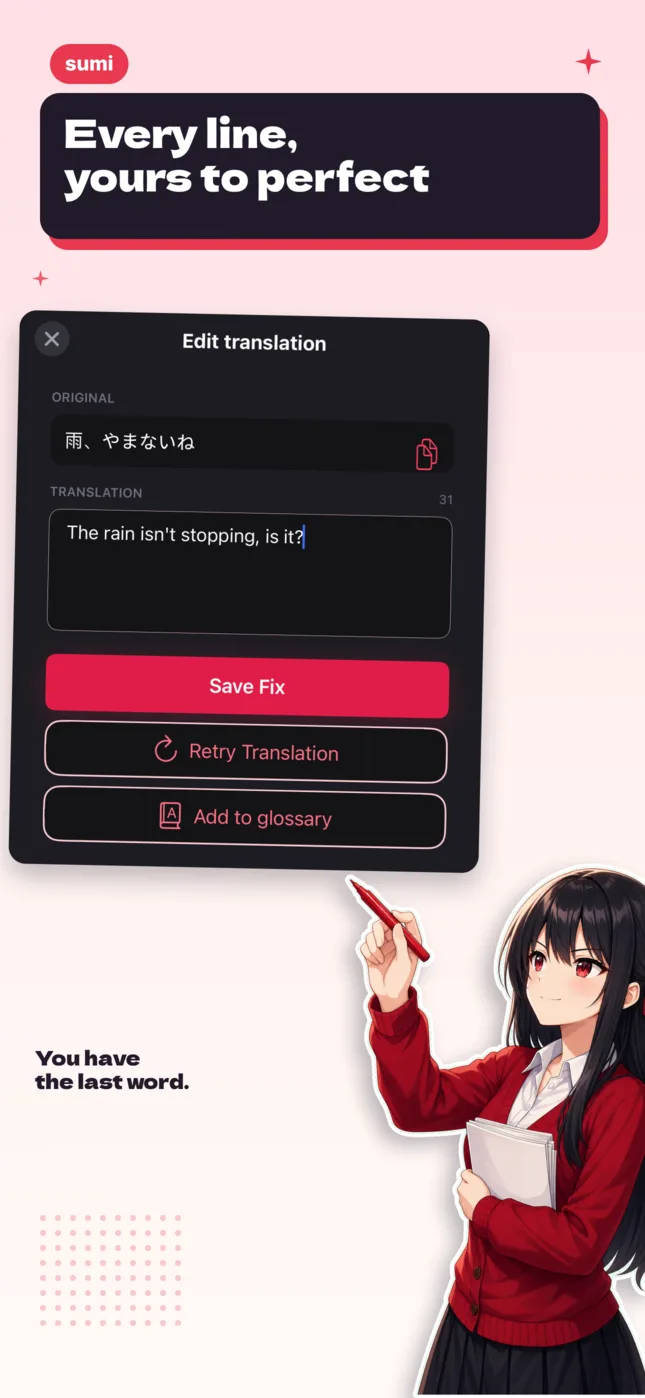
Fix any bubble

Tap any bubble to retranslate, adjust the tone, or edit the text yourself — the artwork underneath stays untouched.

Subscribe or buy pages

Sumi Pro from $6.99/month, or page packs from $1.99 that never expire.

Inside the app

A reader first, a translator second.

The same screens the App Store shows — real pages, real controls, nothing mocked up.

Sumi on iPhone showing a full-screen translated manga page with the page number
Reader
The Edit translation panel in Sumi, with the original line above the editable translation
Edit translation
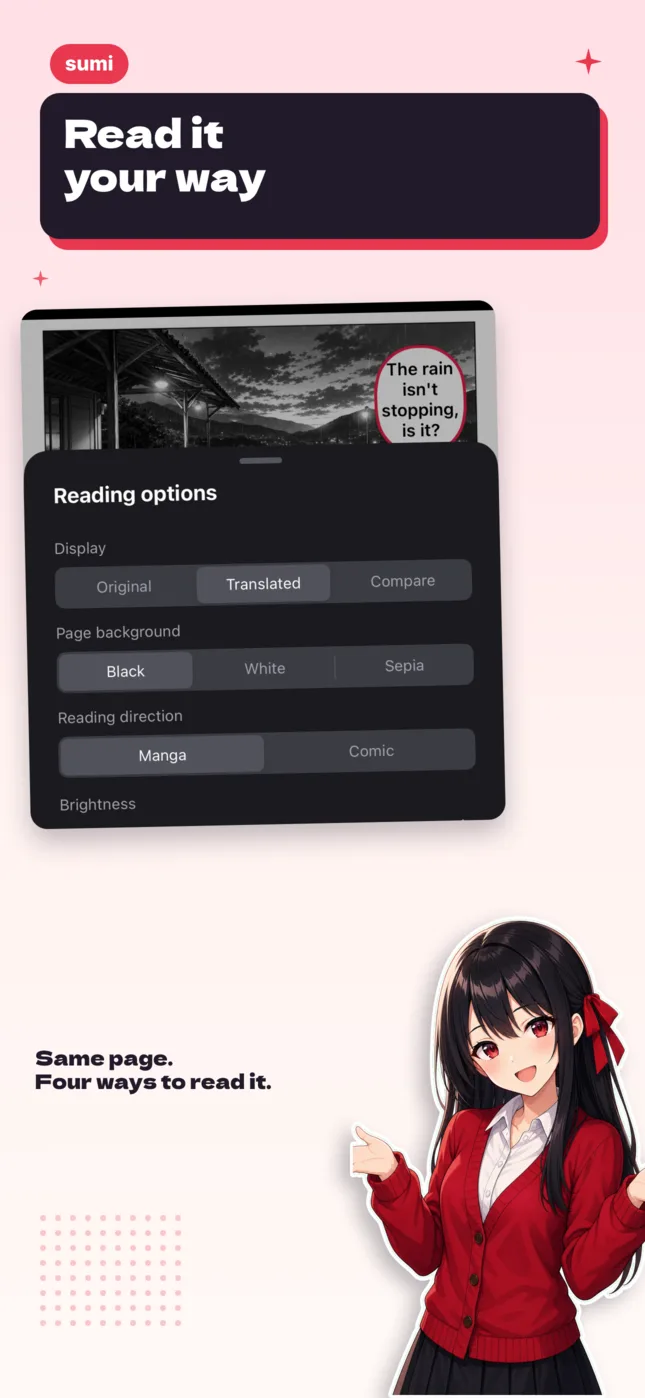
Sumi reading options: original or translated, page background, and reading direction
Reading options
Pricing

Start free. Then subscribe, or just buy pages.

15 welcome pages on us, plus 5 more every day you check in. When the free pages run short, pick whichever fits how you read — both unlock the same cloud translation.

Billing period

Free

Read a little every day, on us

$0
No credit card required

The welcome pages land the moment you install

Translate

  • 15 welcome pages, then 5 a day to claim
  • Our most accurate translation, run in the cloud
  • Seamless text erasure built in
  • Safari extension and the in-app browser
  • Import PDF, ZIP, CBZ, EPUB and photos

Quality & support

  • Pages only count when a translation succeeds
  • Pages never expire
  • One account on iPhone, iPad, Mac, Android and the web
Most popular

Sumi Pro

Save 17%

For reading every day

$5.83$6.99/month
Billed $69.99 once a year

Cancel anytime in Settings

Translate

  • 1,500 cloud pages each billing month
  • Our most accurate translation, run in the cloud
  • Seamless text erasure built in
  • Safari extension and the in-app browser
  • Import PDF, ZIP, CBZ, EPUB and photos

Quality & support

  • Pages only count when a translation succeeds
  • Pages never expire
  • One account on iPhone, iPad, Mac, Android and the web

Page packs

No subscription, and pages never expire.

$5.99one-time
Pack size

Most readers pick this

Translate

  • 1,000 pages · ≈ 50 chapters
  • Our most accurate translation, run in the cloud
  • Seamless text erasure built in
  • Safari extension and the in-app browser
  • Import PDF, ZIP, CBZ, EPUB and photos

Quality & support

  • Pages only count when a translation succeeds
  • Pages never expire
  • One account on iPhone, iPad, Mac, Android and the web

These are App Store prices (USD; your local price may vary). You can also subscribe on mangasumi.com — same plans, same prices — then sign in with the same account in the app: one subscription on every device.

Subscribe on mangasumi.com
Also on Mac

The same app, on your Mac.

On Apple Silicon Macs (M-series), install Sumi straight from the Mac App Store — the real app, not a web wrapper. Same library, same Sumi account, with keyboard shortcuts, trackpad support, and drag-and-drop import from Finder.

  • Drag & drop PDF, CBZ/ZIP, EPUB from Finder
  • ⌘ shortcuts, arrow-key paging, resizable window
  • Same Sumi account as iPhone, iPad and the web
Download on the App Store
Sumi — Walk in Spring
A translated manga page open in the Sumi reader on Mac
FAQ

iPhone & iPad, answered

Is there a free manga translator for iPhone and iPad?+

Yes. You get 15 free pages plus 5 more every day you check in. After that, Sumi Pro is $6.99/month ($69.99/year) for 1,500 cloud pages each billing month, or page packs start at $1.99 for 200 pages and never expire. Subscribe in the app or on mangasumi.com — it is the same subscription on every device.

What can I import?+

PDF, ZIP, CBZ, EPUB, photos, and folders — manga and ebooks alike. On iPad you can drag chapters straight in from the Files app.

Can I translate manga into languages other than English?+

Yes — pick your language and Sumi re-types the translation into the art. Tap any bubble to retranslate, change the tone, or edit a line yourself.

Does it work offline?+

Not right now — on-device offline translation is temporarily off the shelf while we rework it. Cloud translation works on iPhone, iPad and Mac, and needs a connection.

Does Sumi run on Mac?+

Yes — install it from the Mac App Store on Apple Silicon (M-series) Macs. It is the same app as on iPhone and iPad — same library, and the same Sumi account as iPhone, iPad and the web — with keyboard shortcuts and trackpad support. Translation on Mac runs through Sumi cloud; the offline model pack stays on iPhone and iPad for now.