Best manga translator Chrome extension
Reading a manga site in Chrome and want today’s chapter without waiting for a fan translation → start with Sumi. Want the largest free daily allowance an official listing states → MangaLens lists 200 free translations/day. Want a free open-source local option → Libre Manga Translator. Just translating one screenshot → the website uploaders work too; this page is about extensions on the site you already opened.
Sumi is made by us (Rainverse). Every competitor cell below is taken from that product’s own Chrome Web Store page or official site, read on 2026-11-16. We did not install these extensions or re-run side-by-side translation tests for this page.
Sumi erases the original lettering, redraws the art underneath, and typesets the translation into each bubble — vertical text included — live on the manga site you are reading. Open a page and the bubbles appear one by one as they finish. Checked on 110+ real manga sites.
What matters for a manga Chrome extension
Feature lists are easy to copy. For a reader, the page has to stay readable while a new chapter is still only out in Japanese, Korean or Chinese.
Reads lettering inside the art
Dialogue and SFX are part of the image. A normal page translator never sees them; a manga extension has to find and read that text.
Cleans or covers the original
Japanese, Korean or Chinese lettering has to leave the bubble — erased and redrawn, or at least cleanly covered — or the page stays unreadable.
Puts your language back in the bubble
The translation should sit where the original sat, at a readable size, without covering the drawing around it.
Handles vertical type
Japanese manga often runs in vertical columns. The tool has to read that order and replace the text without breaking the balloon.
Keeps going as you read
Nobody stops after one page. Auto-continue on scroll or next-page beats re-clicking every image.
Works on the site you already opened
The point of an extension is today’s chapter on the reader you use — not a second tab of uploads for every page.
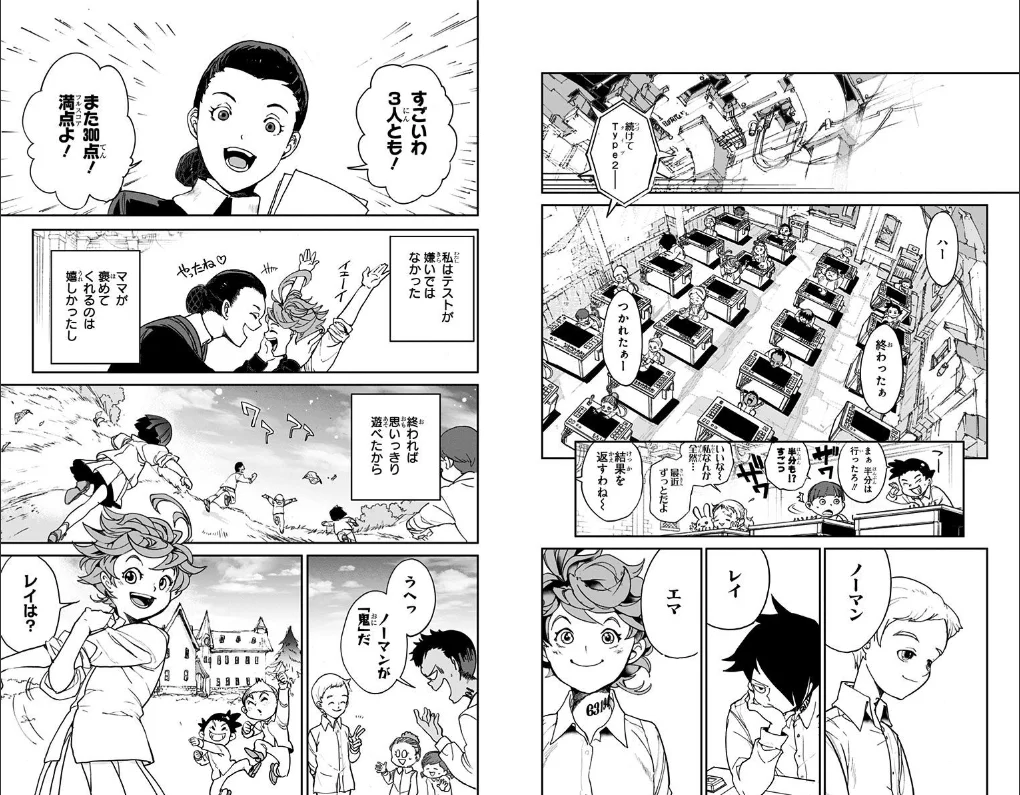
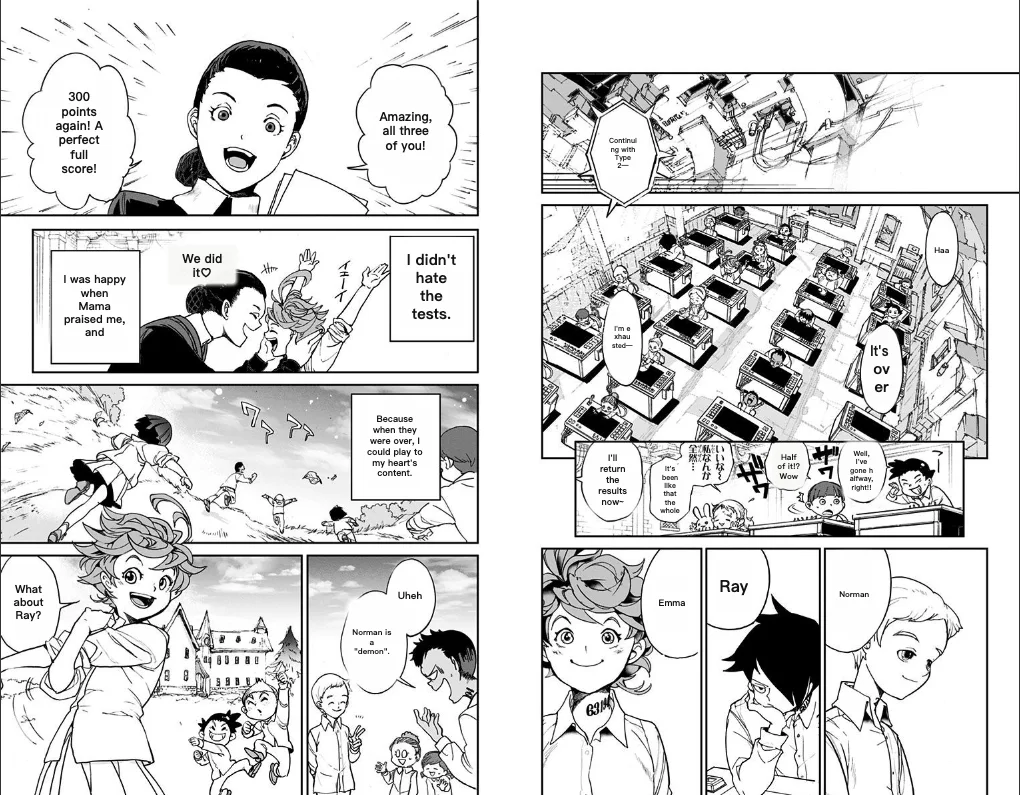 Translated by SumiOriginal
Sumi and the Chrome extensions answer engines name
Browsers, whether the translation sits inside the art, whether it keeps going as you read, site claims, free access without an account, and price — plus 134 target languages in Sumi’s own menus. Competitor numbers and prices are whatever those products published on 2026-11-16.
| Extension | Browsers | Text inside the bubble | Sites | Free access | Price | Keeps translating as you read |
|---|---|---|---|---|---|---|
| Sumi | Chrome, Edge and Firefox extensions; Safari on iPhone/iPad via the Sumi app | Yes: erases the original, redraws the art underneath, typesets into the bubble (vertical included) | Live on the manga site you read; checked on 110+ real manga sites | 1 page on the website with no account; 5 pages on sign-up; 5 more to claim each day | Freemium · see pricing | Yes: opens and translates live; bubbles appear one by one |
| Manga Translator – Scan Translator | Chrome extension (Chrome Web Store) | “Inpainting cleans the original lettering”; translation returns inside the page | Manga or webtoon sites you browse; no full supported-domain list on the official pages we read | 30 free credits after registration; extension install flow asks you to sign in | 12.99€/month (20,000 fast translations/month); one-time packs from 5.99€ | Auto translate continues as you scroll or click next |
| MangaLens | Chrome extension (Chrome Web Store) | Overlays the translation and keeps the artwork intact; does not say it erases the original | Virtually any website that shows manga/webtoon images | 200 free translations/day; core translation can run without signing in (usage-limited) | US$4.99/month or US$49.99/year; Pro listed as unlimited AI translations | Translates only when you click |
| Madomi – Manga Translator | Chrome extension (Chrome Web Store) | Overlays the translation; “art stays untouched” — no clear erase-and-redraw promise | In-place auto translate on sites you read often; selection translate “on any site”; no full compatibility list | 100 free credits per month (1 credit per image) | Premium $5.99/month or $59.99/year; Premium Plus $19.99/month or $179.00/year | Translates as you scroll when enabled |
| Libre Manga Translator | Chrome extension (Chrome Web Store); AGPL-3.0 | Detects/OCRs, then “clean the original text” and typeset | Requests access to translate reader sites you visit; site adapters noted; no full domain list | Listed as Free; local mode needs no API key | Free / open source; optional Gemini uses your own key | Hover to translate manually, or auto-translate one page at a time as you scroll |
| Ichigo Reader / Manga Translator🍓 | Chrome extension (Chrome Web Store) | See the official site | Store: every manga site with Unlocker or Panel Tool; help resource: Unlocker deprecated, some sites work in Firefox but not Chrome — conflict kept | Free trial with no registration required; official site lists 40 extension translations and 20 image uploads total | Official site: Tier 1 $5.99/month or $59.99/year; Tier 2 $19.99/month or $199.99/year | Panel placed on the page; “Everything underneath is translated automatically.” |
| Torii | Chrome extension (Chrome Web Store) | AI inpainting erases original text, then typesets inside each bubble | “Any website” that shows manga/webtoons as images (readers, raws, forums, social) | Free credits on registration; exact amount not stated on the pages we read | Credit packs (e.g. 2,500/$5.99, 6,000/$12.99, 15,000/$29.99); no subscription; packs do not expire | Manual hover, or auto-translate as you scroll |
Competitor cells are taken from each product’s own Chrome Web Store page and official site, read on 2026-11-16. Where those pages are silent we write “See the official site”. We did not install the extensions or re-test translations for this table. Prices and free tiers change — confirm on each product’s site. Target language count for Sumi is 134 (live menu length), not a hard-coded marketing number.
- Want the largest free daily allowance an official listing states? MangaLens lists 200 free translations/day without a credit card.
- Want a free open-source option with an on-device mode? Libre Manga Translator is listed as Free / AGPL-3.0; local mode needs no API key.
- Scan Translator and Ichigo Reader each list 40,000 users on their Chrome Web Store pages; Scan Translator shows a 4.8 rating from 424 ratings.
- Madomi and MangaLens describe their translation as an overlay that keeps the artwork intact; the pages we read do not promise to erase and redraw the original text.
Three ways to read a manga chapter in your language today
Install the Chrome extension
Add Sumi from the Chrome Web Store, open a manga site, and translate live — original lettering erased, your language back in the bubble. Also on Edge and Firefox.
Chrome extension page →Or try one page in the browser
Upload a JPEG, PNG or WebP below. The first page is free with no account. Useful when you only have a screenshot.
Online manga translator →On iPhone, use the app
The Sumi app brings a Safari extension, an in-app browser, and PDF / ZIP / CBZ / EPUB imports — same erase-and-typeset approach.
iPhone manga translator app →Translate one manga page in your browser now
Drop a page or paste a screenshot. Sumi erases the original lettering and typesets the translation into the bubbles. First page free, no account.
Manga translator Chrome extensions
Which Chrome extension is best for translating manga?+
For reading a new chapter today on the site you already opened, pick an extension that erases the original lettering and puts your language back inside the bubble, then keeps going as you scroll. Sumi does that on Chrome, Edge and Firefox. If you want the largest free daily allowance an official listing states, MangaLens lists 200 free translations/day. If you want a free open-source local option, Libre Manga Translator is free under AGPL-3.0.
Do I need an account to translate manga with a Chrome extension?+
With Sumi you can try one page on the website without signing in; a free account adds 5 pages, then 5 more you can claim each day. Scan Translator’s extension flow asks you to sign in (its three-image anonymous trial is on the website, not the extension). MangaLens says core translation can run without signing in, with usage limits. Torii says login is necessary for the extension. Always check the product’s own page.
Can these extensions translate on any manga site?+
No listing we read gives a guarantee for every site. Sumi has been checked on 110+ real manga sites. MangaLens says virtually any site that shows manga or webtoon images. Torii says any website that shows manga or webtoons as images. Ichigo’s store says every manga site with Unlocker or Panel Tool, while its help says Unlocker is deprecated — we keep that conflict rather than flatten it. If a site fails, try another tool or the official page’s own guidance.
Does Sumi work on Edge or Firefox?+
Yes. Sumi ships as a Chrome, Edge and Firefox extension. On iPhone and iPad, live translation in Safari comes with the Sumi app.
How is this different from Google Translate or Google Lens?+
Google Translate’s page mode only changes selectable HTML text — lettering drawn into a manga page is invisible to it. Google Lens is built for pointing a camera at text in the world. A manga Chrome extension has to read text inside the image, clean or cover it, and put a translation back on the page so a chapter stays readable as you scroll.
How much does Sumi cost?+
Sumi is freemium: start free, then paid plans are on mangasumi.com/pricing. This page does not list dollar amounts so a price change cannot leave a stale figure here.